

레온소프트 / 부천시 도약로 189번길 25
사업자등록번호 : 319-13-01368
통신판매신고번호 : 제 2023-경기부천-2371호
평일 오전 10:00 ~ 오후 5:00 / 휴무 토, 일, 공휴일
leo-k@naver.com
©2015-2026. LEON. All right reserved.

레온소프트 / 부천시 도약로 189번길 25
사업자등록번호 : 319-13-01368
통신판매신고번호 : 제 2023-경기부천-2371호
평일 오전 10:00 ~ 오후 5:00 / 휴무 토, 일, 공휴일
leo-k@naver.com
©2015-2026. LEON. All right reserved.
워드프레스 우커머스 장바구니 추가 후 팝업 띄우기

우커머스에서 상품을 장바구니에 추가하면 기본적으로 페이지 상단에 작은 안내 메시지가 표시됩니다. 기능적으로는 문제가 없지만 사용자가 상품을 제대로 담았는지 바로 인지하기 어렵고, 다음 행동도 명확하지 않은 경우가 있습니다. 이번 작업에서는 우커머스의 기본 장바구니 흐름을 조금 개선해 상품을 추가하는 즉시 팝업을 표시하고, 사용자가 바로 다음 행동을 선택할 수 있도록 구성했습니다.
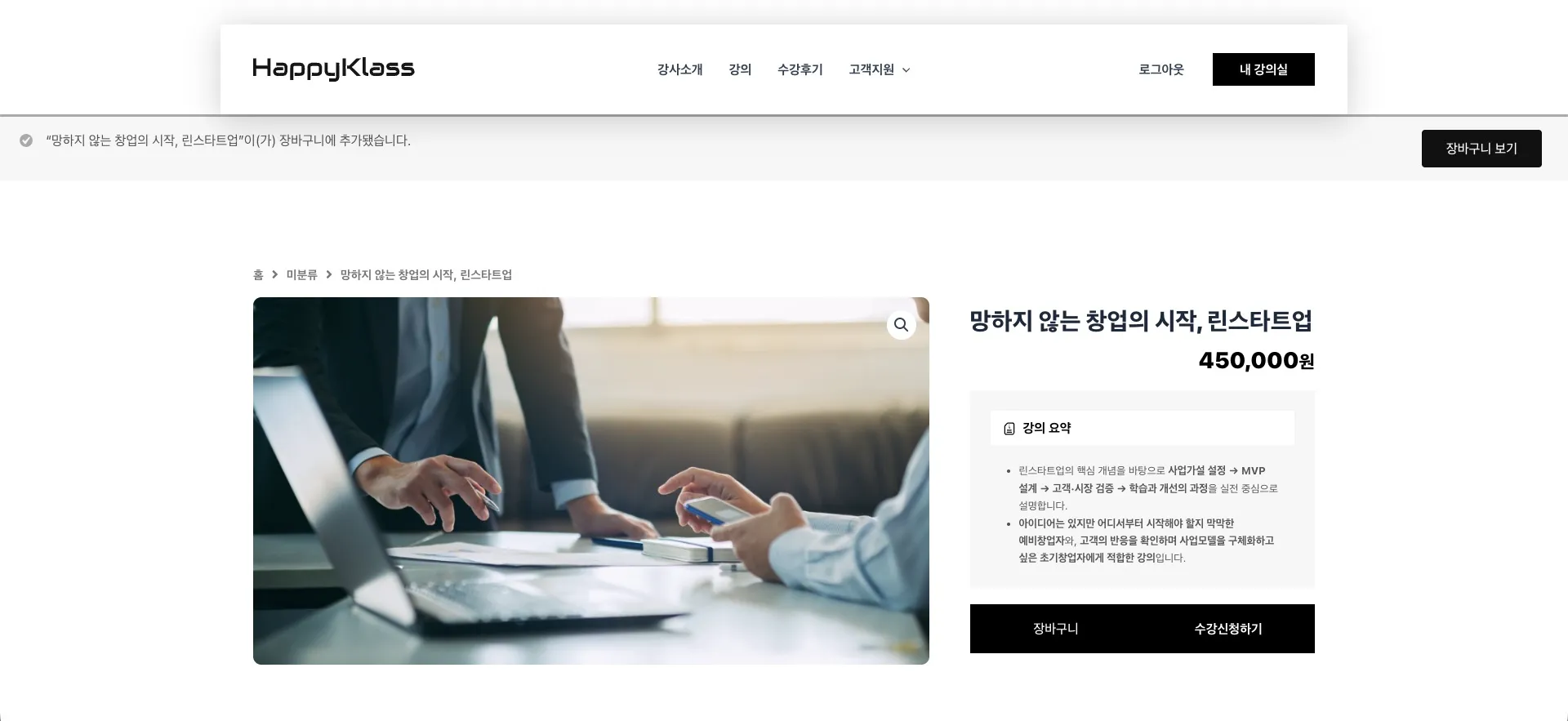
우커머스 기본 구조에서는 상품이 장바구니에 추가되면 다음과 같은 형태의 메시지가 표시됩니다.
실제 고객 사례
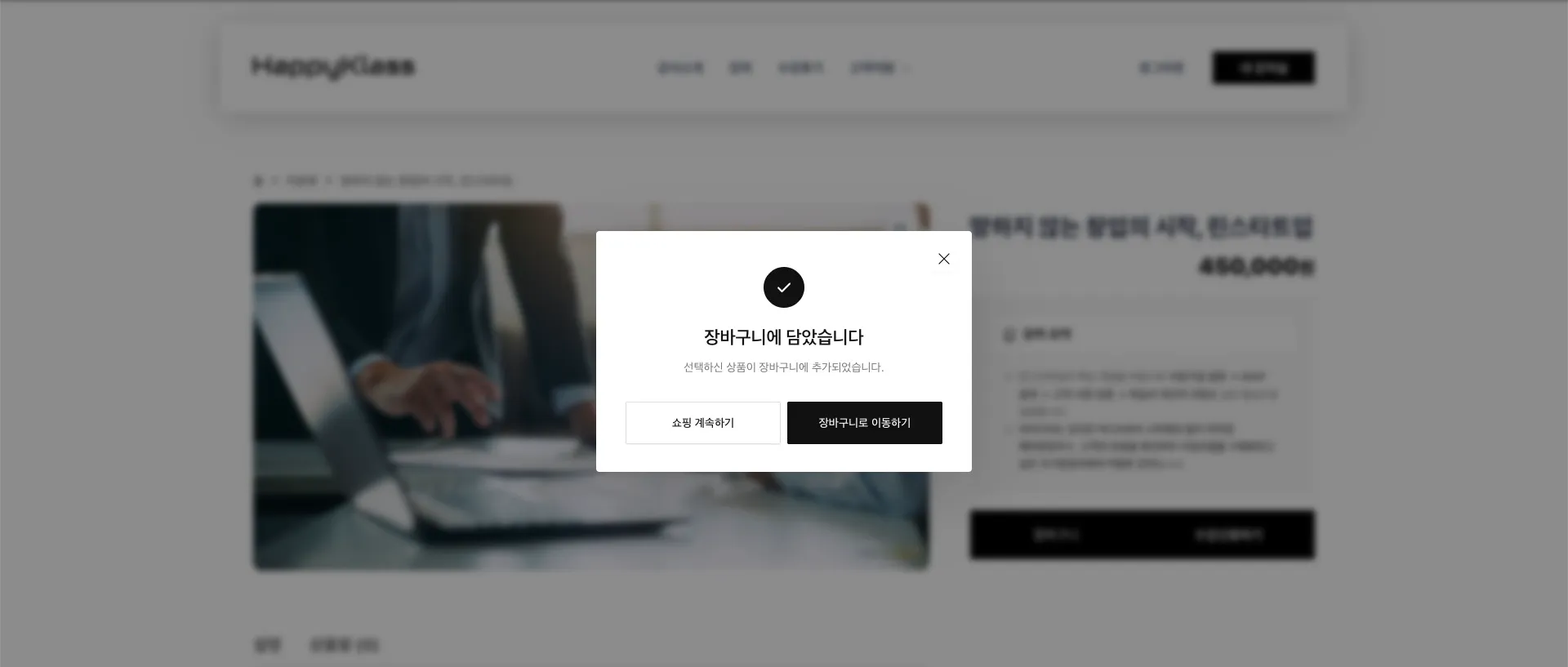
기존에 있던 홈페이지의 UI를 무시하는 투박한 디자인도 문제가 되겠지만, 테마에 따라 장바구니로 이동하는 버튼이 함께 표시되기도 하지만, 보통 페이지 상단에 나타나기 때문에 사용자가 상품 영역을 보고 있는 상황에서는 알림을 바로 확인하지 못할 수도 있습니다. 특히 상품을 계속 둘러볼 수 있는 쇼핑몰에서는 다음 행동을 좀 더 명확하게 보여주는 편이 사용자 경험(UX) 측면에서 좋습니다. 이번에는 장바구니 추가 직후 팝업을 표시하고 다음 두 가지 선택지를 제공하도록 변경했습니다.

쇼핑 계속하기를 선택하면 팝업만 닫히고 현재 페이지에서 계속 상품을 확인할 수 있습니다.
실제 고객 사례
상품의 장바구니 담기 버튼을 클릭하면 상품이 정상적으로 장바구니에 추가된 후 화면 중앙에 팝업이 표시됩니다. 팝업에서는 사용자가 바로 장바구니 페이지로 이동하거나, 현재 페이지에 머물면서 쇼핑을 계속할 수 있습니다. 또한 팝업 외부 또는 닫기 버튼을 이용해 창을 닫을 수 있도록 구성하면 일반적인 모달(Modal) UI와 동일하게 사용할 수 있습니다. 이 방식은 단순히 디자인만 변경하는 것이 아니라 사용자가 다음 행동을 자연스럽게 선택할 수 있게 만들어 우커머스의 기본 장바구니 UX를 개선하는 데 목적이 있습니다.
상품을 장바구니에 담으면 우커머스는 먼저 상품을 정상적으로 장바구니에 추가합니다. 그 작업이 끝난 뒤, 우리가 만든 팝업이 화면에 나타나는 방식입니다. 즉, 기존 장바구니 기능을 새로 만드는 것이 아니라 원래 있던 장바구니 기능은 그대로 두고, 상품이 담긴 다음에 팝업만 추가하는 방식이라고 보면 됩니다.
그래서 사용자는 상품을 담은 직후 바로 쇼핑 계속하기, 장바구니로 이동하기 중 하나를 선택할 수 있습니다.
아래 코드는 우커머스의 장바구니 추가 이벤트를 이용해 팝업을 표시하기 위한 전체 코드입니다. 차일드 테마의 Functions.php에 삽입하거나, 코드 스니펫 플러그인을 설치하여 해당 코드를 삽입하시면 작동됩니다.
/**
 * LEON - WooCommerce Add to Cart Modal
 * 장바구니 추가 완료 메시지를 팝업으로 표시
 */

add_action( 'wp_footer', 'leon_woocommerce_add_to_cart_modal' );
function leon_woocommerce_add_to_cart_modal() {
    if ( ! class_exists( 'WooCommerce' ) ) {
        return;
    }
    // 장바구니/결제 페이지에서는 사용하지 않음
    if ( is_cart() || is_checkout() ) {
        return;
    }
    $cart_url = wc_get_cart_url();
    ?>

    <!-- LEON CART MODAL -->
    <div id="leon-cart-modal" class="leon-cart-modal" aria-hidden="true">
        <div class="leon-cart-modal__backdrop"></div>
        <div class="leon-cart-modal__dialog"
            role="dialog"
            aria-modal="true"
            aria-labelledby="leon-cart-modal-title">
            <button type="button" class="leon-cart-modal__close" aria-label="팝업 닫기">
                <span></span>
                <span></span>
            </button>

            <div class="leon-cart-modal__icon">
                <svg  width="24"  height="24"  viewBox="0 0 24 24"  fill="none"  xmlns="http://www.w3.org/2000/svg">
                    <path  d="M5 12.5L9.5 17L19 7.5" stroke="currentColor" stroke-width="2" stroke-linecap="round" stroke-linejoin="round" />
                </svg>
            </div>
            <div class="leon-cart-modal__content">
                <h3 id="leon-cart-modal-title"> 장바구니에 담았습니다
                </h3>
                <p>선택하신 상품이 장바구니에 추가되었습니다.</p>
            </div>
            <div class="leon-cart-modal__buttons">
                <button type="button" class="leon-cart-modal__continue">쇼핑 계속하기</button>
                <a href="<?php echo esc_url( $cart_url ); ?>" class="leon-cart-modal__cart"> 장바구니로 이동하기 </a>
            </div>
        </div>
    </div>

    <style>
        /* =============================================
           LEON - WooCommerce Cart Modal
        ============================================= */

        body.leon-cart-modal-open {
            overflow: hidden;
        }

        /* Modal */
        .leon-cart-modal {
            position: fixed;
            inset: 0;
            display: flex;
            align-items: center;
            justify-content: center;
            padding: 24px;
            z-index: 999999;
            opacity: 0;
            visibility: hidden;
            pointer-events: none;
            transition: opacity .25s ease, visibility .25s ease;
        }

        .leon-cart-modal.is-active {
            opacity: 1;
            visibility: visible;
            pointer-events: auto;
        }

        /* Background */
        .leon-cart-modal__backdrop {
            position: absolute;
            inset: 0;
            background: rgba(0, 0, 0, .45);
            backdrop-filter: blur(4px);
            -webkit-backdrop-filter: blur(4px);
        }

        /* Dialog */
        .leon-cart-modal__dialog {
            position: relative;
            width: 100%;
            max-width: 460px;
            padding: 44px 36px 34px;
            background: #fff;
            border-radius: 4px;
            box-shadow: 0 30px 80px rgba(0, 0, 0, .16);
            z-index: 2;
            opacity: 0;
            transform: translateY(15px) scale(.98);
            transition: opacity .3s ease, transform .35s cubic-bezier(.2,.8,.2,1);
        }

        .leon-cart-modal.is-active
        .leon-cart-modal__dialog {
            opacity: 1;
            transform: translateY(0) scale(1);
        }

        /* Close */
        .leon-cart-modal__close {
            position: absolute;
            top: 18px;
            right: 18px;
            width: 32px;
            height: 32px;
            border: 0;
            padding: 0;
            background: transparent;
            cursor: pointer;
        }

        .leon-cart-modal__close span {
            position: absolute;
            top: 50%;
            left: 50%;
            width: 18px;
            height: 1px;
            background: #111;
        }

        .leon-cart-modal__close span:first-child {
            transform: translate(-50%, -50%) rotate(45deg);
        }

        .leon-cart-modal__close span:last-child {
            transform: translate(-50%, -50%) rotate(-45deg);
        }

        /* Icon */
        .leon-cart-modal__icon {
            display: flex;
            align-items: center;
            justify-content: center;
            width: 50px;
            height: 50px;
            margin: 0 auto 22px;
            border-radius: 50%;
            color: #fff;
            background: #111;
        }

        /* Text */
        .leon-cart-modal__content {
            text-align: center;
        }

        .leon-cart-modal__content h3 {
            margin: 0 0 10px;
            padding: 0;
            font-size: 22px;
            font-weight: 600;
            line-height: 1.35;
            color: #111;
        }

        .leon-cart-modal__content p {
            margin: 0;
            padding: 0;
            font-size: 14px;
            line-height: 1.7;
            color: #777;
        }

        /* Buttons */
        .leon-cart-modal__buttons {
            display: grid;
            grid-template-columns: minmax(0, 1fr) minmax(0, 1fr);
            gap: 8px;
            margin-top: 30px;
        }

        .leon-cart-modal__continue,
        .leon-cart-modal__cart {
            display: flex;
            align-items: center;
            justify-content: center;
            min-height: 52px;
            padding: 12px 18px;
            border-radius: 2px;
            font-size: 14px;
            font-weight: 500;
            line-height: 1.3;
            text-align: center;
            text-decoration: none !important;
            transition: background .2s ease, color .2s ease, border-color .2s ease;
            cursor: pointer;
        }

        /* Continue */
        .leon-cart-modal__continue {
            border: 1px solid #ddd;
            color: #111;
            background: #fff;
        }

        .leon-cart-modal__continue:hover {
            border-color: #111;
            background: #f7f7f7;
        }

        /* Cart */
        .leon-cart-modal__cart {
            border: 1px solid #111;
            color: #fff !important;
            background: #111;
        }

        .leon-cart-modal__cart:hover {
            color: #111 !important;
            background: #fff;
        }

        /* Mobile */
        @media (max-width: 600px) {
            .leon-cart-modal {
                align-items: flex-end;
                padding: 12px;
            }

            .leon-cart-modal__dialog {
                max-width: none;
                padding: 42px 22px 22px;
                border-radius: 6px;
            }

            .leon-cart-modal__buttons {
                grid-template-columns: 1fr;
            }

            .leon-cart-modal__continue,
            .leon-cart-modal__cart {
                min-height: 50px;
            }
        }
    </style>
    <script>
    (function($) {
        'use strict';

        const modal = document.getElementById('leon-cart-modal');

        if (!modal) {
            return;
        }

        const closeButton =
            modal.querySelector('.leon-cart-modal__close');
        const continueButton =
            modal.querySelector('.leon-cart-modal__continue');
        const backdrop =
            modal.querySelector('.leon-cart-modal__backdrop');

        /* ---------------------------------------------
           Open
        --------------------------------------------- */

        function openModal() {
            modal.classList.add('is-active');
            modal.setAttribute(
                'aria-hidden',
                'false'
            );
            document.body.classList.add(
                'leon-cart-modal-open'
            );
        }

        /* ---------------------------------------------
           Close
        --------------------------------------------- */

        function closeModal() {
            modal.classList.remove('is-active');
            modal.setAttribute(
                'aria-hidden',
                'true'
            );
            document.body.classList.remove(
                'leon-cart-modal-open'
            );
        }

        /* ---------------------------------------------
           AJAX Add to Cart
        --------------------------------------------- */

        $(document.body).on(
            'added_to_cart',
            function() {
                /*
                 * AJAX 장바구니 추가 후
                 * WooCommerce 기본 메시지가 존재할 경우 제거
                 */

            removeWooCartNotice();
                openModal();
            }
        );

        /* ---------------------------------------------
           일반 Add to Cart
           상품 상세 페이지 리로드 방식 대응
        --------------------------------------------- */

        function detectWooCartNotice() {
            const notices =
                document.querySelectorAll(
                    '.woocommerce-message'
                );

            notices.forEach(function(notice) {

                const cartLink =
                    notice.querySelector(
                        'a.wc-forward'
                    );

                if (!cartLink) {
                    return;
                }

                const text =
                    notice.textContent || '';

                /*
                 * 장바구니 추가 성공 메시지만 대상으로 함
                 */

                if (
                    text.includes('장바구니') ||
                    text.includes('cart')
                ) {

                    notice.style.display = 'none';

                    openModal();
                }
            });
        }

        /* ---------------------------------------------
           Remove WooCommerce Default Notice
        --------------------------------------------- */

        function removeWooCartNotice() {
            const notices =
                document.querySelectorAll(
                    '.woocommerce-message'
                );

            notices.forEach(function(notice) {
                const cartLink =
                    notice.querySelector(
                        'a.wc-forward'
                    );

                if (cartLink) {
                    notice.style.display = 'none';
                }
            });
        }

        /* Page load */
        document.addEventListener(
        'DOMContentLoaded',
            detectWooCartNotice
        );

        /* ---------------------------------------------
           Close Events
        --------------------------------------------- */

        closeButton.addEventListener(
            'click',
            closeModal
        );

        continueButton.addEventListener(
            'click',
            closeModal
        );

        backdrop.addEventListener(
            'click',
            closeModal
        );

        document.addEventListener(
            'keydown',
            function(e) {
                if (
                    e.key === 'Escape' &&
                    modal.classList.contains('is-active')
                ) {
                    closeModal();
                }
            }
        );

    })(jQuery);
    </script>
    <?php
}실제 사이트에 적용할 때는 사용 중인 테마와 우커머스 설정에 따라 버튼 클래스나 스타일을 일부 조정할 수 있습니다. 특히 AJAX 장바구니 기능을 비활성화했거나 테마 자체에서 별도의 장바구니 기능을 사용하는 경우에는 이벤트 처리 방식이 달라질 수 있습니다.
코드를 적용한 뒤에는 다음 항목을 확인하는 것이 좋습니다.
우커머스 사이트는 테마나 추가 플러그인에 따라 장바구니 처리 방식이 달라질 수 있기 때문에 운영 사이트에 적용하기 전 테스트 환경에서 먼저 확인하는 것을 권장합니다.
우커머스는 기본 기능만으로도 충분히 쇼핑몰을 운영할 수 있지만, 실제 사이트를 운영하다 보면 작은 UX 차이가 전체적인 사용성에 큰 영향을 주는 경우가 많습니다. 이번 작업처럼 기본 알림 메시지를 팝업(Modal) 형태로 변경하는 것만으로도 사용자가 현재 상황을 더 쉽게 이해하고 다음 행동을 선택할 수 있습니다. LEON에서는 실제 워드프레스, 엘리멘터(Elementor), 우커머스(WooCommerce) 사이트를 운영하고 제작하면서 발생했던 문제와 커스텀 사례를 지속적으로 정리하고 있습니다.
단순한 이론보다 실제 운영 환경에서 사용했던 방법을 중심으로 공유합니다.